Clean every CSV before it reaches your CRM.
Map columns, standardise picklist values, and normalise dates once. Reuse the workflow for every HubSpot, Salesforce, or Pipedrive import.
Your file rows stay in your browser. No credit card required.
See exactly what gets imported before it does.
The mapping table gives you a full view of your file: every column, sample values from your data, and where each one goes in the output. Drag to reorder, toggle columns on or off, split fields, or add synthetic columns in one place.
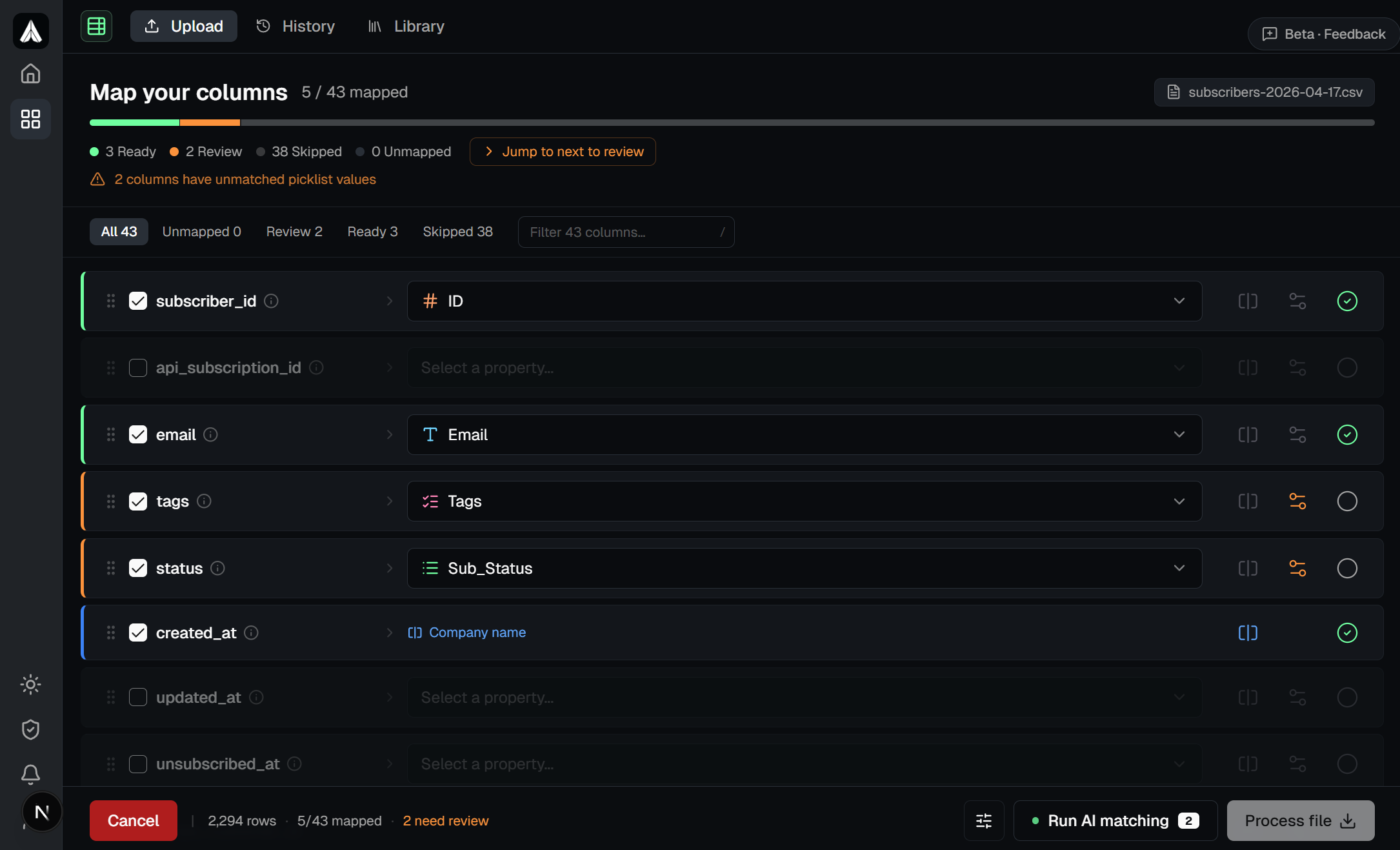
Map once. Reuse on every new file.
Configure the mapping once for a given source format and save it as a named preset. When the next weekly export or monthly data drop arrives, select it from your history and skip straight to download. If the source structure has changed, Asphorem flags the differences so nothing slips through unnoticed.
The more files you process, the faster each one gets. Your mapping library and property definitions carry over to every new file automatically.
Works with any CSV-based import
One account, three time-saving tools.
CSV cleanup before every import. UTM parameters rebuilt before every campaign. Sensitive exports scrubbed before sharing. Asphorem turns each into a one-time setup you reuse forever.
Stop fixing the same CSV problems every import
- Column mapping with drag-to-reorder
- AI value matching for picklist columns
- Date normalisation across regional formats
- Saved mappings & presets
Stop rebuilding UTM parameters from scratch
- Live color-coded URL preview
- Bulk generate from paste, CSV, or sitemap
- Saved templates & known values library
- QR code generation for any UTM URL
- Export full UTM library to CSV
Stop stripping sensitive data by hand
- Redact, hash, or generate fake values per column
- Live preview before downloading
- Saved configs for recurring exports
- 100% client-side, no data uploaded
Consistent UTM tags, every campaign.
Build tagged URLs with a live color-coded preview, save templates for recurring campaigns, and keep every person on the team spelling source and medium the same way.
Five jobs Asphorem makes radically faster.
From one-off CSV cleanup to weekly recurring imports, campaign tracking, and safely sharing sensitive exports. The same platform adapts to the job and gets faster every time you use it.
Try for free. Upgrade when you need to.
Free is built for one-off cleanup and occasional imports. Pro is for teams running recurring import workflows or migrating CRMs at scale.
Free
For one-off cleanup and occasional imports.
- ✓ Access to the 3 tools
- ✓ Up to 5,000 rows per file
- ✓ 20 properties
- ✓ 50 values per picklist property
- ✓ 3 presets
- ✓ 5 saved mappings
- ✓ 5 saved anonymizer configs
- ✓ 20 AI matching runs / month
- ✓ Processing history
- ✗ Save UTM as QR codes
Pro
For recurring import workflows and CRM migrations. Or $64/year (save 18%)
- ✓ Access to the 3 tools
- ✓ Up to 200,000 rows per file
- ✓ 1,000 properties
- ✓ 500 values per picklist property
- ✓ 50 presets
- ✓ 50 saved mappings
- ✓ 50 saved anonymizer configs
- ✓ 1,000 AI matching runs / month
- ✓ Priority support
- ✓ Save UTM as QR codes
- ✓ Everything in Free
Common questions.
Everything teams usually want to know before they get started.
Is my data safe? Where does the file actually go?
CSV file rows never leave your browser. All parsing, mapping, and processing happens client-side in JavaScript. Asphorem has no server endpoint that receives your file.
The only data sent over the network is the unique values from picklist columns you choose to send for AI matching. Even that step is optional. You can disable AI matching entirely and run normalisation locally.
We do not store, log, or have any access to your file contents.
What CRMs and tools does it work with?
Anything that accepts CSV. HubSpot, Salesforce, Pipedrive, Zoho, Microsoft Dynamics, Copper, Close. Beyond CRM: Shopify, Klaviyo, Mailchimp, ActiveCampaign, and any tool with a CSV importer. The output is a standard CSV file you can upload anywhere.
Do I need a credit card to start?
No. The free plan covers most individual workflows: 5,000 rows per file, 20 properties, 5 saved mappings, 20 AI matching runs per month. Sign up with your email, no card required.
What's the difference between the CSV Normalizer and the UTM Builder?
The CSV Normalizer is for cleaning and standardising data files before they're imported into a CRM or other tool. The UTM Builder is for creating and managing UTM-tagged URLs for campaign tracking.
They solve different problems but follow the same principle: do the setup once, reuse it every time instead of starting from scratch.
Make repetitive ops work repeatable.
Start with the tool you need today, then save the workflows you use again. Free plan included. No credit card required.